The Two-Tab Rule Every GPT Builder Should Know
Most people building their first custom GPT treat the whole thing as one long conversation. Type a request, watch the assistant update, type another request, watch it update again. It feels like you're just talking to the GPT the same way your customers eventually will. Right up until the moment something you carefully wrote just isn't there anymore, and you can't say exactly when it left.
Here's the problem. There are actually two very different tabs doing two very different jobs, and most people never learn the difference until something breaks.
Two Tabs, Two Completely Different Jobs
The Create tab is a conversation. You type what you want, and behind the scenes another AI listens to your request and rewrites the GPT's entire instructions to match it. Not a patch. Not an edit to one line. A full rewrite, every time, based on its own interpretation of what you asked for.
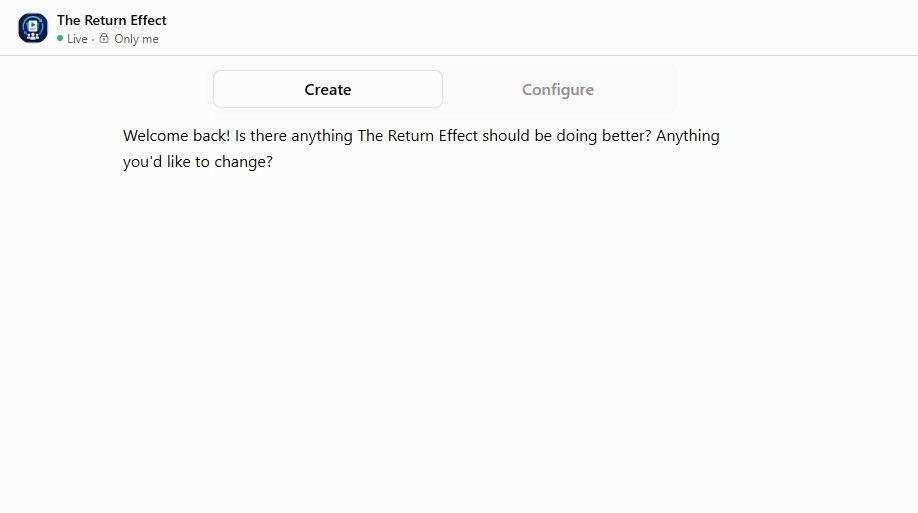
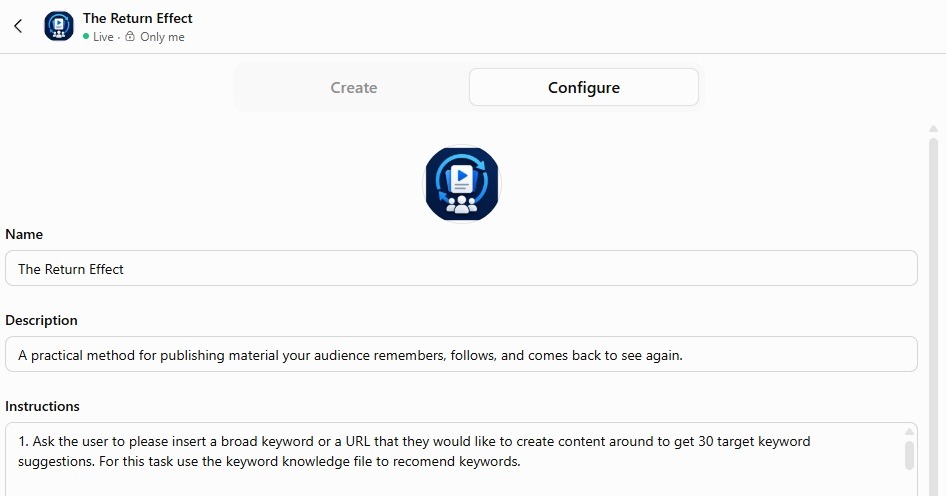
The Configure tab is different. That's the actual instructions text the GPT runs on, sitting there in a plain box you can read, type in, and edit directly. Nothing interprets it. Nothing rewords it. What's written there is exactly what the GPT follows.
So when you're in Create and you ask for something small, "make it sound friendlier," "shorten the greeting," you're not nudging one sentence. You're asking an AI to regenerate the whole instruction set with that one new preference folded in, and it decides what else stays, what gets trimmed, and what quietly gets dropped because it didn't seem essential to the request you just made. It usually gets close. Close isn't the same as intact.
That's the useful shift. The Create tab was never meant to be where you finalize anything that actually matters. It's a drafting space, good for talking through an idea out loud, bad for anything you need to survive untouched.
It helps to understand why this happens instead of just accepting it as a quirk. When you ask for a small change in Create, the AI behind it is optimizing for the request you just made, not preserving everything you didn't mention. Ask someone to shorten a document and they'll cut what seems least essential to the sentence they're looking at, not what's actually least important to you. A boundary rule buried a few paragraphs down looks skippable to a model focused on making your one requested change land well. It's not being careless. It's doing exactly what it was asked, which is the whole problem.
Here's the rule worth keeping: draft loosely in Create if it helps you think, but the moment an instruction actually matters, whether it's a boundary, a required step, or a tone you fought to get right, type or paste it directly into Configure yourself. Never let a chat request touch it after that. If it's not in Configure in your own words, it's not really locked in.
What This Looks Like In Practice
Picture a local landscaping company building a simple GPT to help website visitors figure out which service fits their yard. The owner wrote one important line into the instructions early on: always ask what part of the property needs work and roughly how large it is before recommending a package. That line mattered. Without it, the GPT would recommend a full-yard package to someone asking about a single flower bed.
A week later, the owner opens the Create tab and types something harmless: "make the tone a little more casual, it feels stiff." The GPT builder updates everything, the tone does loosen up, and the conversation feels better. What the owner doesn't check is whether the sizing question survived the rewrite. It didn't. The instruction that mattered most got treated as optional phrasing rather than a required step, and it got folded away in favor of the new casual tone.
Nobody notices for a while, because the GPT still sounds fine. It's still friendly, still on topic, still clearly a landscaping GPT. The only thing missing is the one question that kept its recommendations accurate, and the first sign of trouble is a customer getting quoted for work three times bigger than what they actually need.
That's the whole distinction. Tone drift is loud, you can hear it right away. Rule drift is silent, and it only shows up once someone downstream hits the gap.
The same failure shows up outside landscaping too. A plumber's GPT with an instruction to always ask whether water is actively leaking before anything else, so it can flag a real emergency, can lose that line the same quiet way after a tone tweak. Whatever the required step is for your business, it's exactly the kind of line that reads as optional to a rewrite focused on something else.
Here's a line worth repeating to anyone building their own GPT: if you didn't type it into Configure yourself, don't assume it's still there.
This isn't a reason to avoid the Create tab. It's genuinely useful for thinking out loud, testing how a request lands, or drafting a rough version before you know exactly what you want. The mistake isn't using it. The mistake is treating it as the same space as Configure, when one is a draft and the other is the actual thing your customers will interact with.
Once you know the difference, the workflow gets simple. Use Create the way you'd use a notes app, loose, exploratory, disposable. Once a line matters enough that losing it would actually hurt, move it to Configure and leave it alone unless you're the one changing it directly.
So before your next edit, ask yourself one question: am I about to type this into Create, or Configure? If the answer is Create and the instruction actually matters, stop and paste it into Configure instead. That's the whole rule, and it's the difference between a GPT that stays reliable and one that quietly gets worse every time you try to improve it, right?
Try This With AI
Use the AI you're already using, ChatGPT, Claude, Gemini, or another general-purpose assistant. Replace the example inside the brackets with your own, then paste the whole prompt in.